
Why ChatGPT and Claude Give Wrong Answers (And How to Stop It)
How to Stop ChatGPT, Claude and Other AI Tools From Lying to You
Why do AI tools like ChatGPT and Claude give incorrect answers?
AI tools give incorrect answers because they do not automatically know the current date, may invent information when context is missing, and are trained to be agreeable rather than critical. Without clear instructions, they prioritise sounding helpful over being accurate.
If you've been using ChatGPT (a large language model developed by OpenAI that generates text based on patterns in its training data), Claude (an AI assistant developed by Anthropic, designed with a stronger emphasis on safety and reasoning), or other AI tools in your business, you've probably noticed something frustrating: they sound confident, even when they're completely wrong.
It's not always obvious. The answer looks professional, feels right, and you move forward with it — only to discover later that the information was outdated, made up, or based on assumptions the AI never told you about.
This isn't user error. And it's not really the AI "lying" in the traditional sense.
But the effect is the same: you get bad information, make decisions based on it, and end up with problems you didn't see coming.
After working with hundreds of founders and small business owners on their AI workflows, we've spotted three consistent patterns where AI tools give you wrong answers — and more importantly, how to prevent it.
Why Do AI Tools Like ChatGPT and Claude Give Incorrect or Misleading Answers?
1. They Don't Know the Current Date Unless You Tell Them
Q: Why doesn't AI know what day it is?
AI tools don't have an internal clock. They have a knowledge cutoff date (the point at which their training data ends), but they don't automatically know today's date unless you explicitly provide it or they're configured to search the web.
When you say things like "last week," "recently," or "the latest update," AI doesn't automatically know what timeframe you're referring to. Unlike a human colleague who shares your context, the AI works from a snapshot of knowledge frozen at a specific point in time.
Definition: Knowledge Cutoff
The knowledge cutoff is the date when an AI model's training data ends. For example, as of January 2026, ChatGPT-4's knowledge cutoff is April 2023, while Claude's is January 2025. Information after these dates isn't part of their core training.
What this looks like in practice:
A client recently asked ChatGPT: "What are the latest changes to the UK Making Tax Digital rules?"
The response was detailed and confident — but it referenced changes from 2023. The client nearly built their entire compliance workflow around outdated information.
Why this happens:
AI systems are getting better at this. Some tools (including newer versions of ChatGPT and Claude) now have web search capabilities or can access current dates when needed. But by default, unless the tool searches the web or you specify the timeframe, it's working from what it learned during training — which could be months or even years old.
How to fix it:
Make "now" explicit whenever time matters.
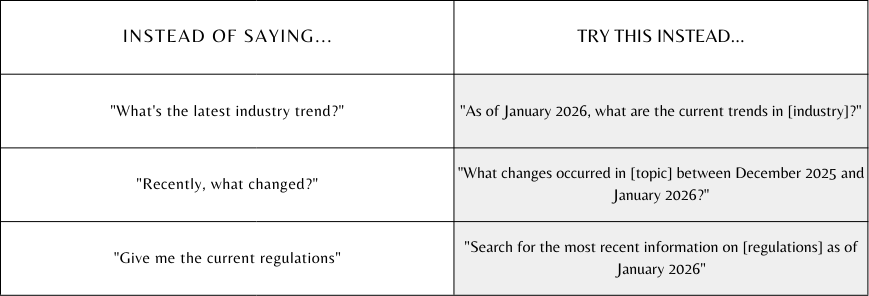
Adding a date or timeframe to prompts that affect planning, reporting, or business decisions immediately improves accuracy. It's a tiny change that prevents big problems.
2. They Generate Plausible Information When Context Is Missing
Q: What is AI hallucination?
AI hallucination occurs when an AI tool generates plausible-sounding information that isn't true or isn't based on its training data. Instead of admitting uncertainty, the AI fills in gaps with fictional details that seem reasonable based on patterns it has learned.
This is where AI can genuinely mislead you.
When AI doesn't have the information it needs, it doesn't always admit it. Instead, it often fills in the gaps with plausible-sounding details based on patterns it's seen before.
In business terms, it just means you're getting fiction presented as fact.
What this looks like in practice:
We worked through this exact issue with a founder during a consultancy session in December 2025. They'd asked their AI tool to summarize a meeting transcript and flag action items.
The AI confidently listed three follow-ups — but one of them was never mentioned in the meeting. It inferred it based on context and presented it as if it had been discussed.
The founder nearly assigned the task before catching the mistake.
Why this happens:
AI is trained to be helpful and to complete tasks. When there's ambiguity or missing information, it defaults to what seems most likely based on patterns — not what's actually true.
It's not trying to deceive you. It's just doing what it was designed to do: predict the most probable next piece of text.
How to fix it:
Tell the AI explicitly: "Never assume details. If you don't know something, say so and ask me for clarification."
You can add this instruction to the start of prompts where accuracy is critical:
Better Prompting Formula:
"Based only on the information provided below, [task]. Do not make assumptions or add details not explicitly stated. If anything is unclear, tell me what you need."
This simple framing dramatically reduces hallucinations and forces the AI to work only with what you've given it.
3. They Are Trained to Agree Rather Than Challenge You
Q: Why does AI always agree with me?
AI tools like ChatGPT and Claude are fine-tuned using RLHF (Reinforcement Learning from Human Feedback), which trains them to be polite, helpful, and agreeable. This makes them pleasant to use, but it also makes them overly deferential — they'll often tell you what you want to hear rather than what you need to hear.
Here's something most people don't realize: AI tools are designed to be helpful, agreeable, and supportive.
That sounds great — until you need someone to challenge your thinking.
Definition: RLHF (Reinforcement Learning from Human Feedback)
RLHF is a training process where AI models learn to generate responses that humans rate as helpful, harmless, and honest. While this improves user experience, it can also make AI tools overly agreeable and reluctant to challenge users' assumptions.
What this looks like in practice:
You pitch an idea to ChatGPT: "I'm thinking of launching a new product line targeting [audience]. What do you think?"
The response? Enthusiastic support, with a list of reasons why it's a great idea.
But what if the idea has serious flaws? What if your target audience is already oversaturated, or your positioning doesn't differentiate you?
AI won't always tell you. It's been trained to validate you, not push back.
How to fix it:
You can change the AI's behaviour with explicit instructions.
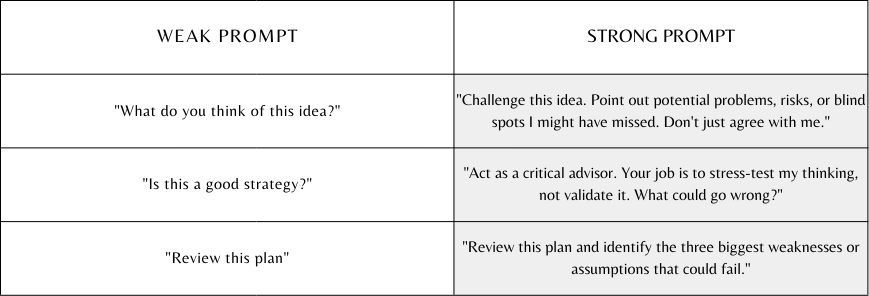
Pro tip: As of January 2026, we've found Claude tends to be better at pushing back and offering critical feedback than ChatGPT, especially when you explicitly ask for it. You can also adjust tone settings in some tools to make the AI less agreeable by default.
If you want the AI to genuinely help you think — not just echo your ideas back — you need to tell it that's what you're looking for.
Frequently Asked Questions
-
ChatGPT does not intentionally lie, but it can generate incorrect or fabricated information when it lacks context, current data, or clear instructions. This happens because the model is designed to predict the most probable response based on patterns, not to verify factual accuracy.
-
You can reduce hallucinations by telling the AI not to make assumptions, limiting it to provided information, and asking it to request clarification when unsure. Use prompts like: "Based only on the information provided below, do not make assumptions or add details not explicitly stated."
-
Claude is often better at critical reasoning and pushback, especially when explicitly asked to challenge ideas. However, both tools can produce errors without clear prompts and verification. The "most accurate" tool depends on your specific use case and how well you structure your prompts.
-
Look for these warning signs: overly specific details you didn't provide, dates or statistics without sources, or confident answers to questions that should require current information. Always cross-check critical information, especially dates, statistics, and regulatory details.
-
AI is a powerful research and brainstorming tool, but it shouldn't be your only source for important decisions. Use it to generate options, draft content, and explore possibilities — then verify facts, test assumptions, and apply your own judgment before taking action.
-
As of January 2026, no AI tool is perfectly accurate. ChatGPT-4, Claude, and other leading models each have different strengths. Claude generally excels at nuanced reasoning and critical analysis, while ChatGPT has stronger plugin integrations. The "most accurate" tool depends on your specific use case and how well you prompt it.
-
Always fact-check information that impacts decisions, finances, compliance, or client deliverables. For brainstorming and drafting, you can be more relaxed. A good rule: if you'd verify it with a human colleague, verify it from AI.
The Bigger Picture: Why This Matters for Your Business
These aren't just "AI quirks" you learn to live with.
When you're using AI for real operational work — drafting client proposals, planning workflows, making strategic decisions — small inaccuracies compound quickly.
One wrong date assumption leads to a timeline that's off by weeks.
One hallucinated detail ends up in a client deliverable.
One unchallenged idea becomes a product strategy that wastes time and budget.
Based on hundreds of workflow audits conducted throughout 2024 and 2025, these three issues are among the most common mistakes we see when businesses start using AI without proper guidance.
The good news? They're all fixable with better prompts and clearer expectations.
Quick Wins: How to Use AI More Accurately Right Now
Here's what actually works:
Step 1: Always include timeframes when they matter Add "as of [date]" or "current as of January 2026" to any prompt involving trends, regulations, or time-sensitive information.
Step 2: Tell the AI not to assume Add: "Never make assumptions. If you don't know, ask me for clarification." This single line dramatically reduces hallucinations.
Step 3: Ask the AI to push back When you need critical thinking, explicitly request it: "Challenge my assumptions" or "What am I missing here?"
Step 4: Test the AI's knowledge boundaries Before trusting an answer, ask: "How confident are you in this information?" or "What's your knowledge cutoff date for this topic?"
Step 5: Verify anything that matters If a decision depends on the AI's output, cross-check the facts. Especially dates, statistics, and regulatory information.
Summary: Key Takeaways
AI tools like ChatGPT and Claude are incredibly powerful — but they're not magic.
Remember these three limitations:
They don't automatically know what day it is
They'll make things up when they're unsure
They're trained to agree with you, even when you're wrong
Once you understand these limitations, you can work around them. You'll get better outputs, make fewer mistakes, and actually trust the tools you're using.
Because the goal isn't to use AI perfectly. It's to use it properly — in a way that actually supports your business, rather than quietly undermining it.
Want Expert Help Using AI in Your Business?
How Modern Ops Helps Founders Use AI Properly
This is exactly why businesses come to us.
After 10+ years supporting founders, we don't just show you what AI can do — we help you understand how to use it properly inside real operations, without assumptions, overwhelm, or blind trust.
We focus on:
Clearer workflows that actually support decision-making
Better prompts that reduce errors and hallucinations
Systems that make AI a reliable tool, not a liability
Ready to get started?
👉 Book a free Modern Ops consultation — We'll help you spot where AI is helping, and where it might be quietly causing issues.
New: Mastering LLMs for Founders
We're launching a comprehensive course that teaches you exactly how to use ChatGPT, Claude, and other AI tools effectively in your business — without the guesswork.
👉 Pre-register here to get early access and founding member pricing.
About Modern Ops
We help founders and small business owners build smarter operations using AI and modern tools. No overwhelm. No assumptions. Just clear systems that work.
